How It All Fits Together
You've learned the pieces one at a time. Here's what happens when they all work together - starting the moment you type a web address and press Enter.
Anatomy of One Click
Every topic below is a real step in this same chain
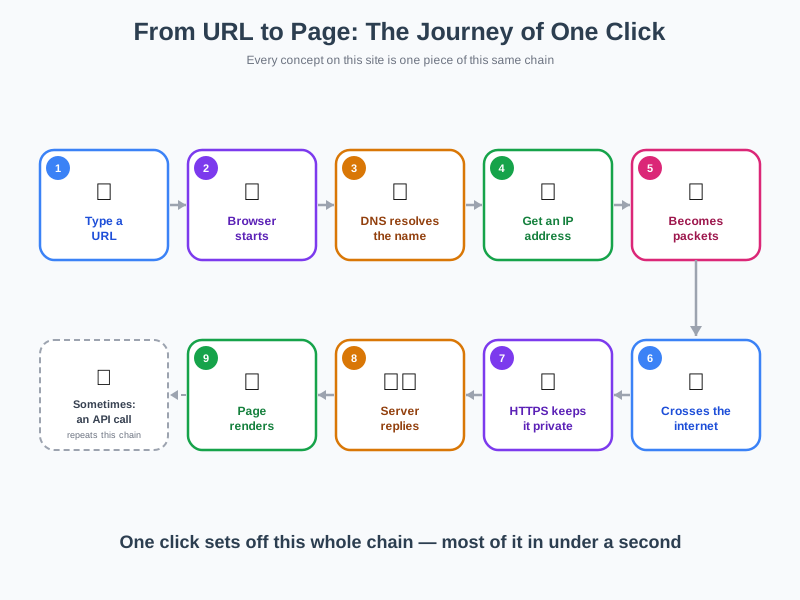
You type a URL
Every part of that address tells your browser exactly which server to contact and which page to ask for.
Learn more about URLsYour browser gets to work
It reads that address and prepares to ask the internet for the page it points to.
Learn more about BrowsersDNS looks up the address
The browser asks DNS to translate that human-friendly name into the numerical address computers actually use.
Learn more about DNSDevices get an IP address
That numerical address is an IP address - a unique number identifying both your device and the destination server.
Learn more about IP AddressesYour request becomes packets
Rather than travelling as one stream, your request is broken into small, independently addressed packets.
Learn more about IP PacketsPackets cross the internet
Each packet leaves through your Wi-Fi router, then hops across the global network of connected computers, sometimes by a completely different route.
Learn more about The Internet · Wi-Fi & RoutersHTTPS keeps it private
If the site uses HTTPS, the contents of those packets are encrypted so only your browser and the server can read them.
Learn more about HTTPS & EncryptionA server replies
A server - or a nearby copy of the site on a CDN - receives your reassembled request and sends back the files needed to build the page.
Learn more about Servers · CDNsYour browser builds the website
HTML, CSS, and JavaScript work together so your browser can turn that response into the page you actually see and use.
Learn more about WebsitesSometimes, there's more to fetch
If the page needs extra data - live weather, comments, search results - your browser quietly repeats this whole journey by calling an API.
Learn more about APIsEverything Else You've Learned
Not every topic fits into a single click - here's where the rest belong
Building the Page
What developers actually write to create the page that arrived in your browser.
Behind the Scenes
The tools and infrastructure developers use to build and run that code.
Keeping It Safe
Protecting you, your data, and your privacy once you're connected.
Where Things Are Headed
Newer ideas reshaping how software gets built and trusted.