What is HTTPS & Encryption?
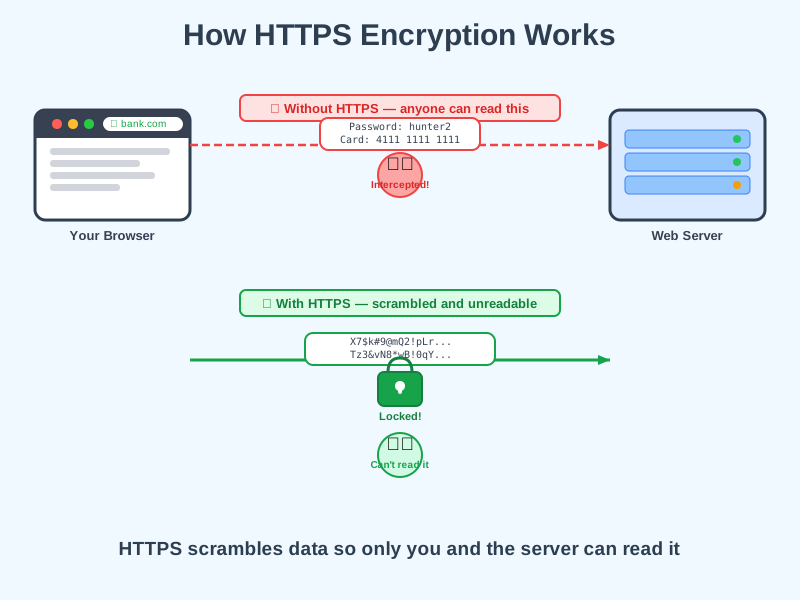
Encryption scrambles your data so only the intended recipient can read it - the padlock in your browser means this is happening.
Think of it like this
Imagine sending a letter in a locked box that only the recipient has the key to. Even if someone intercepts it along the way, all they see is a locked box - they can't read what's inside.
What's happening
Summary
HTTPS uses encryption to scramble data in transit so it can only be read by you and the website you're talking to.
A Closer Look
HTTP is the basic language browsers and servers use to exchange data. HTTPS is the same thing but with a security layer on top called TLS (you may also hear the older name, SSL). Before any data is sent, your browser and the server perform a quick handshake - they agree on a shared secret key that nobody else knows. From that point on, everything is scrambled using that key, so even if someone intercepts the traffic, they just see meaningless characters.
The padlock icon in your address bar is the browser's way of telling you this protection is active. If a site uses plain HTTP instead, modern browsers will warn you that the connection is not secure.
Common Misconceptions
- HTTPS does not mean the website is trustworthy - it only means the connection is encrypted. A scam site can still have a padlock.
- Encryption does not hide which websites you visit - your internet provider can still see you connected to google.com, just not what you searched for.
- HTTPS is not optional for modern websites - browsers actively warn users about HTTP sites, and search engines rank HTTPS sites higher.
How it connects
HTTPS is a security layer that sits on top of the web's existing infrastructure:
Try it yourself
Click the padlock icon in your browser's address bar on any website - you'll see certificate details showing who verified the site's identity and that the connection is encrypted.