What is DNS?
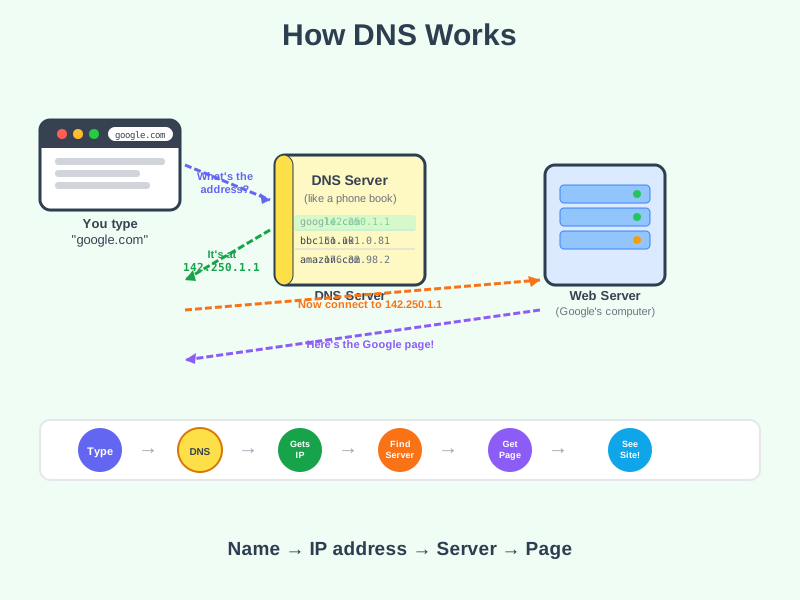
DNS is like a phone book for the internet - it translates website names like "google.com" into the numerical address computers actually use to find each other.
Think of it like this
You know your friend as "Sarah", but your phone needs her number to actually call her. DNS does the same job - it looks up the name you typed and finds the real number behind it.
What's happening
Summary
DNS converts human-friendly names into the numerical addresses computers use to connect.
A Closer Look
Every device on the internet has a numerical address called an IP address - something like 142.250.1.1. Those are hard for humans to remember, so we use names like "google.com" instead. When you type a web address, your browser quietly asks a DNS server to look it up. The DNS server checks its records and replies with the right IP address. Your browser then uses that number to contact the correct server and fetch the page.
This all happens automatically in milliseconds, every single time you visit a website - you just never see it.
Common Misconceptions
- DNS doesn't host websites - it only looks up addresses. The actual content lives on a separate web server.
- Changing your DNS settings doesn't make you anonymous - it can speed up lookups or bypass some blocks, but it doesn't hide your identity.
- DNS isn't just for websites - it's used for email, apps, and almost every internet-connected service.
How it connects
DNS is a behind-the-scenes step that makes the whole web easier to use:
Try it yourself
Open your terminal or command prompt and type nslookup google.com - you'll see the IP address that DNS returns for that name. That's the actual number your browser uses to connect.