What is a Browser?
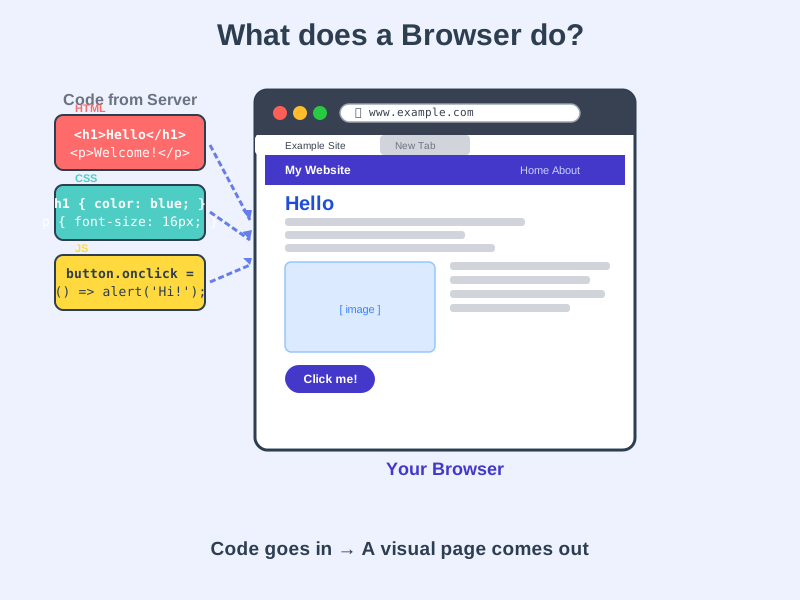
A browser is a program that reads website code and turns it into the pages you see on screen.
Think of it like this
It's like a translator - the website sends instructions written in code, and the browser reads those instructions and builds what they describe, right in front of you.
What's happening
Summary
A browser fetches code from a server and converts it into the visual pages you interact with.
A Closer Look
When you type a web address and press Enter, your browser contacts a server and downloads three types of files: HTML for structure, CSS for styling, and JavaScript for interactivity. The browser then processes all three together - like assembling flat-pack furniture from a manual - and draws the finished page on your screen. This whole process, called rendering, happens in a fraction of a second.
Browsers also handle a lot of invisible work: checking security certificates (the padlock icon), managing your saved passwords and cookies, and making sure pages from different websites can't interfere with each other.
Common Misconceptions
- A browser is not a search engine - Chrome and Firefox are browsers; Google and Bing are search engines that happen to run inside a browser.
- The internet is not the browser - the internet is the network of connections; the browser is just one tool you use to access it.
- All browsers are not identical - Chrome, Firefox, Safari, and Edge each have their own rendering engine, which is why websites can occasionally look slightly different in each one.
How it connects
A browser is the tool that brings together everything a website is made of:
Try it yourself
On any web page, right-click and choose View Page Source - that's the raw code your browser received and translated into what you're seeing right now.