What is a Terminal?
A terminal is a text-based window where you type commands directly to your computer, instead of clicking buttons and icons.
Think of it like this
Most of the time you control your computer like ordering at a restaurant by pointing at pictures on a menu - tap an icon, see a result. A terminal is like ordering by speaking your order aloud in the restaurant's exact phrasing: it's faster and more precise once you know the words, but the computer won't guess what you mean if you get them wrong.
What's happening
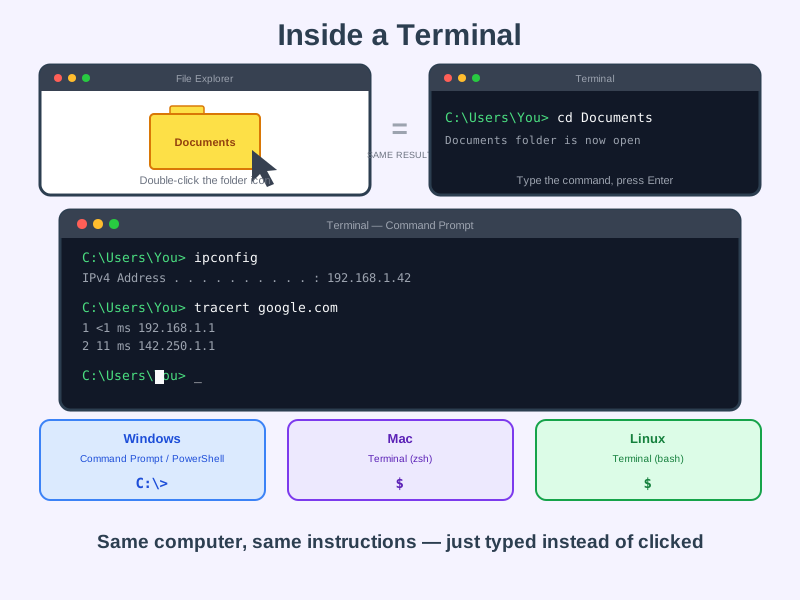
Summary
A terminal lets you type instructions straight to your computer using text commands - the same actions apps perform with buttons, just typed instead of clicked.
A Closer Look
A terminal shows a prompt - a short bit of text waiting for your input, like C:\Users\You> or $ - followed by a blinking cursor. You type a command (the name of the action you want, like ping or cd), sometimes followed by extra details called arguments, then press Enter. The terminal runs it immediately and prints the result as text right below.
The window itself goes by different names depending on your operating system: Windows has Command Prompt and PowerShell; Mac and Linux both have an app simply called Terminal, which runs a "shell" (commonly bash or zsh) underneath. They all do the same basic job - give you a direct, typed line to your computer.
Common Misconceptions
- Using a terminal isn't "hacking" - it's simply a different way of giving your computer the same instructions you'd otherwise give by clicking, and it predates graphical interfaces entirely.
- Typing a command and pressing Enter isn't inherently risky - read-only commands like the ones used on this site, such as
ipconfig,nslookupandtracert, only display information; they don't change or delete anything. - "Terminal", "command prompt", "console" and "shell" aren't all technically identical, but in everyday conversation people use them interchangeably to mean the same basic idea.
How it connects
The terminal is the tool behind several "try it yourself" moments on this site:
Try it yourself
Open a terminal: on Windows, search for Command Prompt in the Start menu; on Mac, search for Terminal in Spotlight; on Linux, search Terminal in your applications menu. Type echo Hello World and press Enter - this command is completely harmless, it just prints the text straight back at you. Type, Enter, read the result: that's the entire loop.