What is an IP Address?
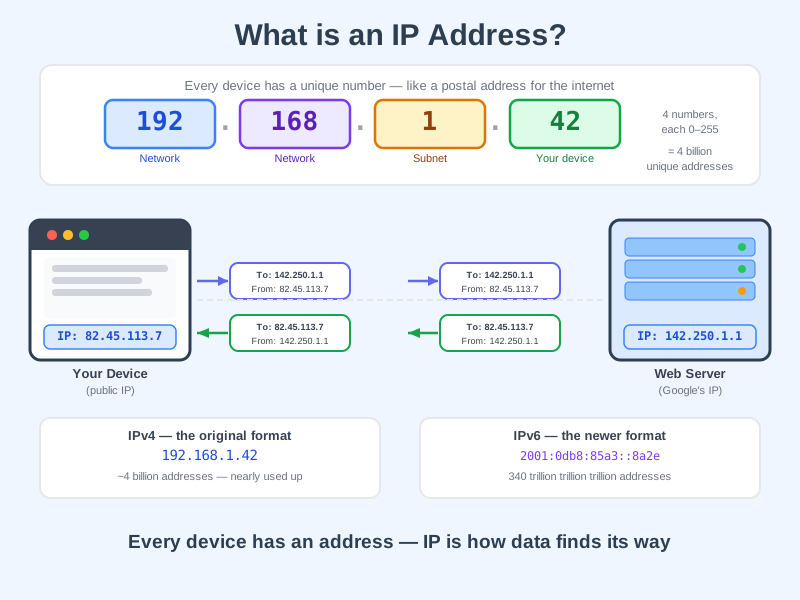
An IP address is a unique number assigned to every device on the internet, so data knows where to go and where to come back from.
Think of it like this
It's like a home address for your device - when you send a letter, it needs your address so the reply can find its way back to you. Without IP addresses, data packets would have no idea where to go.
What's happening
Summary
An IP address is the unique number that identifies your device on the internet, letting data travel to and from the right place.
A Closer Look
The most common format, IPv4, looks like four numbers separated by dots - for example 192.168.1.42. Each number can be between 0 and 255, giving roughly 4 billion possible combinations. That sounds like a lot, but the internet ran out, which is why a newer format called IPv6 was created. IPv6 addresses are much longer and can support an almost limitless number of devices.
You actually have two IP addresses in play when you browse the web. Your public IP is assigned by your internet provider and is what websites see - it identifies your whole household. Your private IP is assigned by your router and identifies your specific device within your home network.
Common Misconceptions
- An IP address does not reveal your exact home address - it typically points to a general area or your internet provider's nearest exchange, not your street.
- Your IP address is not fixed - most home internet connections are assigned a new public IP address periodically by your provider.
- A VPN does not make you invisible - it replaces your IP address with the VPN server's address, but someone could still trace activity back to the VPN provider.
How it connects
IP addresses are the foundation that everything else on the internet is built on top of:
Try it yourself
Search "what is my IP address" in any search engine - it will show your current public IP address. Then open your terminal and type ipconfig (Windows), ipconfig getifaddr en0 (Mac) or ip addr (Linux) to see your private IP address assigned by your router.