What is an IP Packet?
An IP packet is a small chunk of data wrapped in its own header with sender and destination addresses, so it can travel the internet independently and be reassembled at the other end.
Think of it like this
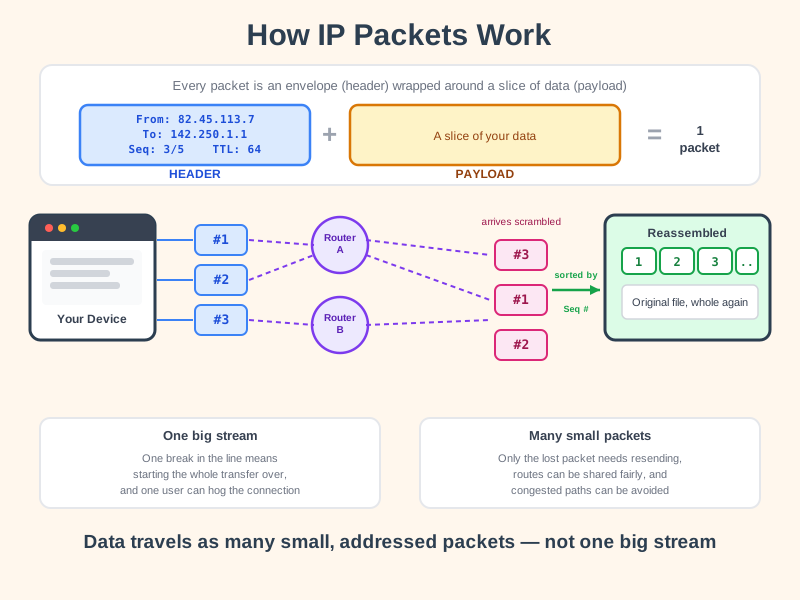
Imagine mailing a 500-page book by tearing out each page and posting it separately in its own envelope, addressed to the same recipient and numbered "page 12 of 500". The pages might travel different routes through the postal system and arrive in any order, but the recipient just sorts them by number and reads the book correctly. That's exactly what your device does with data - it tears it into packets, addresses each one, and trusts the network to deliver them.
What's happening
Summary
An IP packet is the small, addressed piece that all internet data gets broken into - chopped up, labelled with sender and destination details, sent independently, and reassembled in the right order when it arrives.
A Closer Look
Every packet has two parts: a header and a payload. The header is like the outside of an envelope - it carries the source IP address, the destination IP address, and a few other details like a TTL (Time To Live) that stops lost packets from wandering the network forever. The payload is the actual slice of data being delivered - a fragment of a webpage, a video, or a message. IP's only job is getting each packet to the right address; putting them back in order is handled by a partner protocol called TCP, which adds its own small label inside the payload with a sequence number for each piece.
Data isn't sent as one continuous stream because that would be fragile and inefficient. By splitting it into packets, a network can route each one independently - sometimes through completely different paths - and share the connection fairly between everyone using it. If a single packet gets lost or corrupted along the way, only that packet needs to be resent, not the entire file.
Common Misconceptions
- Packets don't always arrive in the order they were sent - they can take different routes at different speeds and are reassembled using the sequence numbers TCP adds, not their arrival time.
- Breaking data into packets doesn't make it secure on its own - encryption is what protects the contents; packets without it can still be read by anyone who intercepts them.
- A lost packet doesn't mean the whole transfer fails - protocols like TCP detect missing packets and simply request that those specific ones be sent again.
How it connects
IP packets are the actual "stuff" that travels across everything else you've learned about:
Try it yourself
Open your terminal and type tracert google.com (Windows) or traceroute google.com (Mac/Linux). You'll see the list of routers your packets actually hop through to reach their destination - often a dozen or more, even though the whole trip takes a fraction of a second.