What is a URL?
A URL is the full web address of a page - it tells your browser exactly which server to contact and which page to ask for.
Think of it like this
It's like a postal address with extra detail - the domain is the building, the path is the specific room, and the query string is any special instructions for when you arrive.
What's happening
Summary
A URL is a precise set of instructions that tells your browser how to connect to a site and exactly which page to retrieve.
A Closer Look
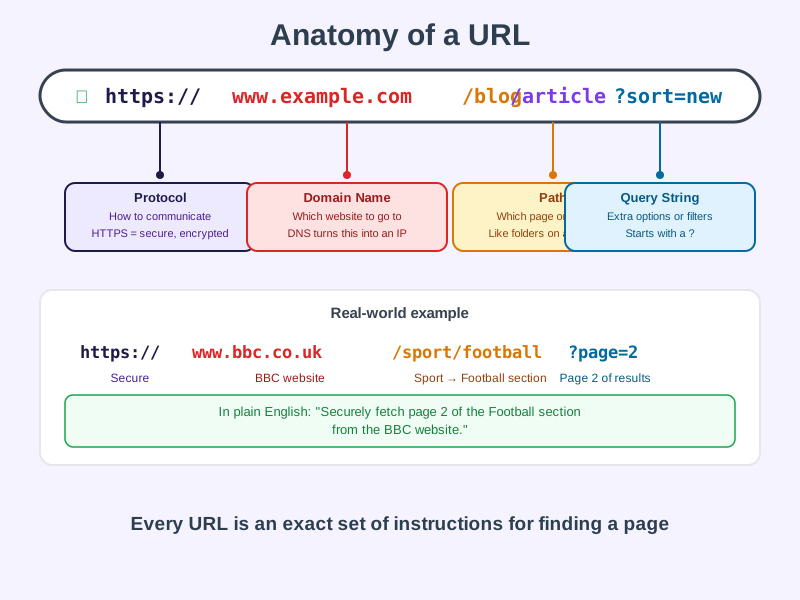
Every URL has up to four parts working together. The protocol (https://) says how to communicate - securely or not. The domain name (www.example.com) identifies which website, and DNS translates it into an IP address your browser can actually use. The path (/blog/article) points to a specific page on that site, like navigating folders. The optional query string (?sort=new) passes extra instructions, often used for search filters or pagination.
URL stands for Uniform Resource Locator - "uniform" because every address follows the same predictable structure, anywhere in the world.
Common Misconceptions
- A URL and a domain name are not the same thing - the domain is just one part of the full URL.
- The
wwwis not required - it's a historical convention, and most sites work fine without it. - URLs are not case-sensitive everywhere - the domain part is not case-sensitive, but the path after it can be, depending on the server.
How it connects
A URL ties together several web technologies in a single line of text:
Try it yourself
Click into your browser's address bar on any page and read the URL carefully - identify the protocol, the domain, the path, and any query string. Try changing a query string value (like a page number) and pressing Enter to see what happens.