What is Wi-Fi? How Do Routers Work?
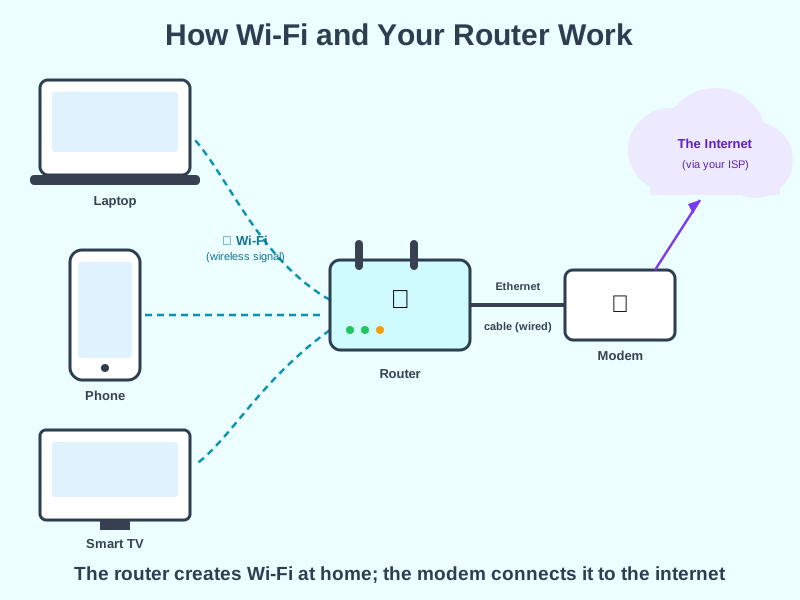
Wi-Fi is the wireless signal your devices use to connect to your router, and the router is the box that creates that signal and shares your internet connection around your home.
Think of it like this
Your router is like a receptionist at the front desk of a building. Deliveries (your internet connection) arrive at the front desk from outside, and the receptionist directs each one to the right office (device) - except here, the deliveries travel over radio waves instead of hallways.
What's happening
Summary
Wi-Fi is the wireless signal that lets your devices talk to your router without cables, and the router is the hardware that creates your home network and shares one internet connection between everything on it.
A Closer Look
Two separate boxes usually make this work, even though many homes combine both into one device. The modem connects to your internet service provider (ISP) - over a phone line, cable, or fibre - and translates that signal into something your home network can use. The router takes that single internet connection and shares it between every device in your home, creating the local Wi-Fi network your phone and laptop connect to.
Every device on your Wi-Fi gets its own private IP address from the router, so it can tell your laptop's traffic apart from your phone's. When data comes back from the internet, the router knows exactly which device asked for it and delivers it to the right one - the same private-vs-public IP address split covered on the IP Addresses page.
Common Misconceptions
- Wi-Fi isn't the same as the internet - Wi-Fi is just the wireless link to your router; you can have a working Wi-Fi network with no internet connection at all if your ISP is down.
- A router and a modem aren't the same device, even though many ISPs supply a single box that does both jobs - the modem talks to your ISP, the router creates your home network.
- More Wi-Fi bars doesn't always mean a faster connection - signal strength affects reliability, but your actual speed is still capped by what your ISP provides through the modem.
How it connects
Wi-Fi and your router sit right at the start of every internet connection:
Try it yourself
Open your Wi-Fi settings and look at the list of nearby networks - each one is a different router within range. Then open a terminal and type ipconfig (Windows), ipconfig getifaddr en0 (Mac) or ip addr (Linux) to see the private IP address your own router assigned to your device.