Cookies vs Local Storage
Local storage is another way websites save data in your browser - like cookies, but it holds more, stays only on your device, and isn't sent to the server with every request.
Think of it like this
A cookie is like a stamped passport you carry and show every time you cross a border - it travels with you. Local storage is more like a filing cabinet in your own house: it just sits there holding whatever was put in it, and nobody sees inside unless they're standing in your house looking.
What's happening
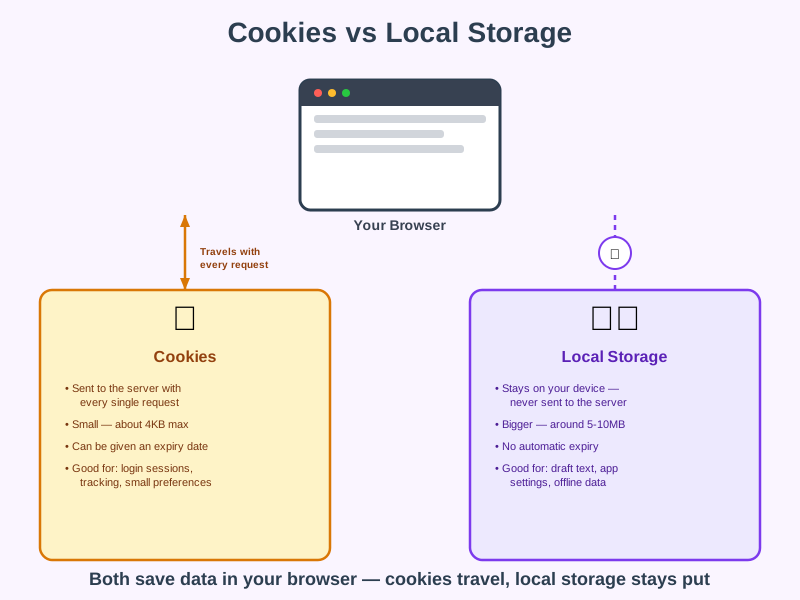
Summary
Local storage is a second way browsers save data for websites - it holds more than a cookie and never leaves your device on its own, which makes it better for some jobs and worse for others.
A Closer Look
Cookies were invented first, back when the web needed a way to remember who was logged in - so they're automatically attached to every request a browser makes to that site, which is exactly what a login session needs. Local storage arrived later, built specifically for websites that wanted to save larger amounts of data purely for their own use, like a half-written draft or your preferred settings, without the overhead of sending it back and forth constantly.
This split is why modern websites often use both at once: a small cookie to identify your login session, and local storage for everything else the page wants to remember about how you like things set up.
Common Misconceptions
- Local storage doesn't expire on its own - a cookie can be set to disappear after a day or a year, but local storage stays until the website clears it or you wipe your browser data yourself.
- Local storage isn't automatically more private - any JavaScript running on that page can read it, including malicious code if a site has been compromised, so it isn't a safe place for passwords or sensitive data.
- Local storage isn't sent over the network at all - which is actually the opposite of a common assumption that "anything saved by a website gets sent back to it."
How it connects
Local storage sits alongside cookies as another browser storage tool:
Try it yourself
Press F12 on any website, go to the Application tab (Chrome) or Storage tab (Firefox), and click Local Storage - you'll often find saved settings or draft data sitting there, completely separate from the site's cookies.