What are Cookies?
A cookie is a small file a website saves on your device to remember things about you, like that you're logged in.
Think of it like this
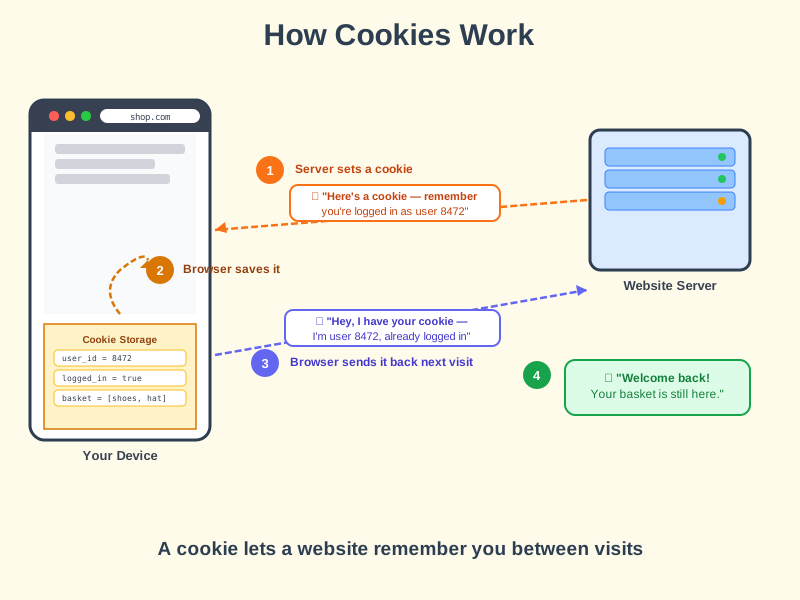
It's like a cloakroom ticket - when you first arrive, the website hands you a ticket with a number on it. Every time you come back, you show your ticket, and the website knows exactly who you are and where you left off.
What's happening
Summary
Cookies are tiny pieces of data that websites store on your device so they can remember you between visits.
A Closer Look
When you log in to a website, the server creates a small note - the cookie - and sends it to your browser to store. It might say something like user_id = 8472, logged_in = true. Every time your browser makes a request to that same website, it automatically sends the cookie back, so the server knows it's still you.
Not all cookies are for login. Some remember your preferences (dark mode, language), some keep your shopping basket intact, and some track which pages you visited so advertisers can show you relevant ads. That last type is why the "Accept cookies" banner exists - those tracking cookies require your consent under privacy laws in many countries.
Common Misconceptions
- Cookies are not viruses or malware - they are plain text files that can only be read by the website that created them.
- Accepting cookies does not give a website access to your files, camera, or anything on your device beyond that small note.
- Deleting cookies does not delete your account - it just means the site won't recognise you next time and you'll need to log in again.
How it connects
Cookies work quietly in the background wherever websites and browsers meet:
Try it yourself
Press F12 on any website, go to the Application tab (Chrome) or Storage tab (Firefox), and click Cookies - you'll see every cookie that site has stored on your device right now.