What is a CDN?
A CDN (content delivery network) is a network of servers spread around the world that stores copies of a website's files, so you're served from whichever copy is closest to you.
Think of it like this
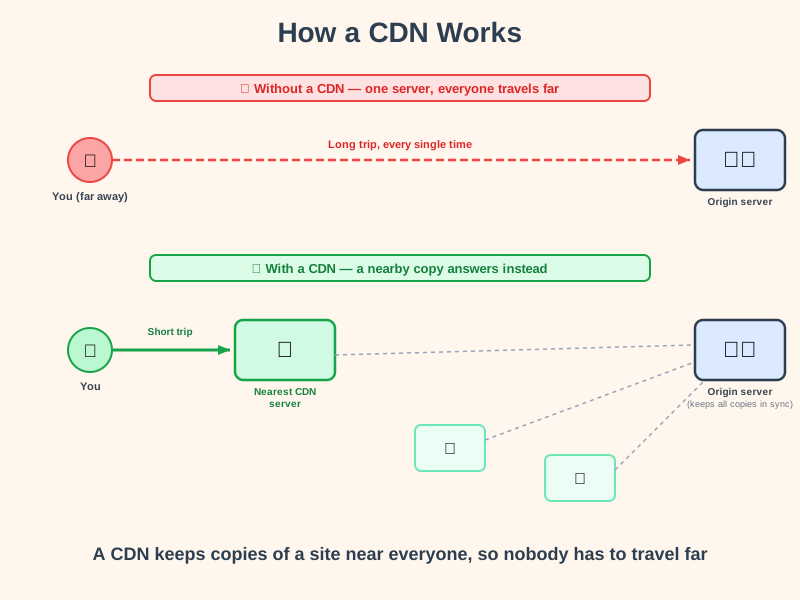
It's like a chain of bakeries instead of one central bakery. If you want bread, you go to your nearest branch rather than having a loaf shipped from one bakery on the other side of the country. A CDN keeps copies of a website's files at many locations worldwide, so everyone is served from a nearby branch.
What's happening
Summary
A CDN spreads copies of a website's files across servers around the world, so your browser fetches them from whichever copy is geographically closest, instead of one single server far away.
A Closer Look
Without a CDN, every visitor's request has to travel all the way to wherever the website's one server happens to be - which can mean a genuinely long trip if that server is on the other side of the world. A CDN solves this by keeping copies of the site's files, especially unchanging ones like images, videos, and stylesheets, on servers dotted around the globe. When you visit, you're automatically routed to the nearest copy.
The original server, often called the origin, is still in charge - it's where the real files live, and the CDN's copies are kept in sync with it. This is why CDNs work best for content that doesn't change on every request; personalised or constantly-updating data often still has to go back to the origin.
Common Misconceptions
- A CDN isn't one single server - it's a whole network of them, deliberately spread across many locations.
- A CDN isn't only for huge websites - many small sites use one too, since modern CDN services are often cheap or free.
- A CDN doesn't replace the need for an origin server - it sits in front of one, caching copies of what it serves.
How it connects
A CDN is infrastructure that sits between a website and its visitors:
Try it yourself
On any website, press F12, open the Network tab, reload the page, and click the main document request. Look through the response headers for names like cf-ray, x-cache, or x-served-by - signs that a CDN handled your request.