What is the Internet of Things (IoT)?
The Internet of Things means everyday objects, like thermostats, doorbells and light bulbs, that connect to the internet so they can be controlled remotely.
Think of it like this
It's like giving every appliance in your home its own phone line to a call centre. The thermostat, the doorbell and the light bulbs can each report what they're doing and take instructions, and you can ring the call centre from anywhere to check on them or change something. Handy - but every extra line is one more door into your home that needs a good lock.
What's happening
Summary
The Internet of Things is all the ordinary objects that now have a small computer and an internet connection inside, so they can be monitored and controlled from an app. Most of them rely on the maker's cloud service to do the clever part.
A Closer Look
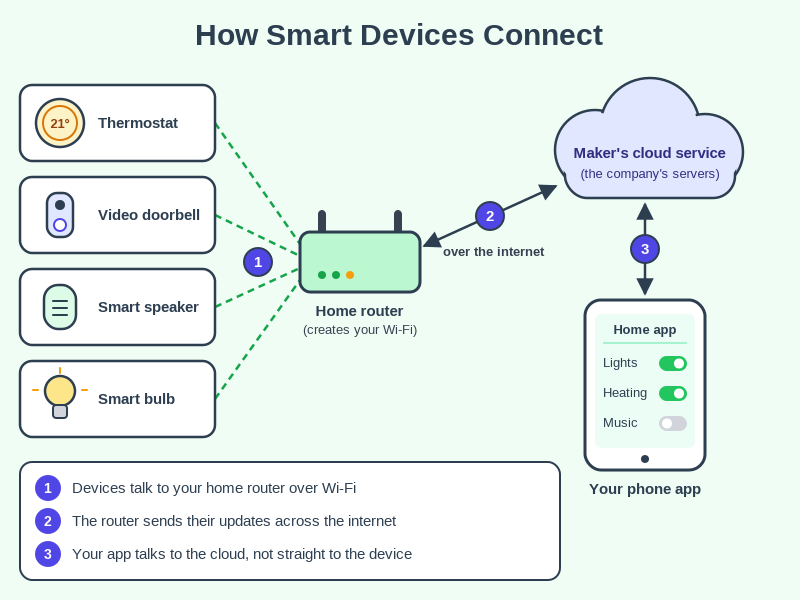
Inside each smart device is a tiny, low-cost computer, a sensor or switch, and a wireless radio. Most connect to your home Wi-Fi just like a phone would, while some, such as certain smart bulbs and sensors, use low-power radio systems like Zigbee, Thread or Bluetooth and talk to a small hub plugged into your router. Surprisingly, your phone app usually doesn't talk to the device directly. Instead, the device keeps in touch with the manufacturer's cloud service, and the app sends its instructions there too. That middleman is what lets you switch the heating on from the office, but it also means many smart features stop working if your internet connection drops or the company's servers have a problem.
The phrase Internet of Things was coined in 1999 by the British technologist Kevin Ashton, long before smart speakers existed. It covers far more than gadgets at home: fitness trackers, smartwatches, connected cars, energy smart meters, and sensors that watch over machines in factories or soil moisture on farms are all part of it. What they share is a simple loop - a sensor notices something, the information travels over the internet, and something happens as a result. At home that loop powers automations, little rules such as switching the hall light on when the front door opens after dark, or turning the heating down once everyone's phone has left the house.
Every smart device is a small computer on your network, and it deserves the same care as a laptop. Cheap gadgets sometimes ship with weak default passwords and receive few or no security updates. In 2016 a piece of malware called Mirai took over huge numbers of cameras and routers that still used their factory passwords, then used them together to knock major websites offline. The basics go a long way: change any default password, protect the app account with a unique password and two-factor authentication, switch on automatic updates, and favour brands that promise updates for years. Many routers also offer a guest network, which keeps gadgets separate from the laptops and phones that hold your personal files.
Common Misconceptions
- "Smart" doesn't mean a device thinks for itself - most smart devices simply follow your settings and schedules, and hand the heavy lifting to the maker's servers.
- A device being inside your home doesn't make its data private - what it records usually travels to the manufacturer's cloud service, and their privacy policy decides what happens next.
- Smart speakers aren't sending every conversation off to be recorded - they listen on the device for their wake word and only start sending audio after hearing it, although accidental triggers do happen.
Frequently asked questions
Do smart devices still work if the internet goes down?
Usually only partly. Many keep doing their basic job - a smart thermostat normally sticks to its schedule, and a smart bulb still turns on and off with the wall switch - but remote control from your phone, voice commands and anything relying on the maker's servers often stop until the connection returns. Some systems can run automations locally through a hub. If a company shuts its cloud service down altogether, some devices lose features or stop working entirely.
Why won't my smart plug connect to my Wi-Fi?
A common reason is that many low-cost smart devices only work on the 2.4 GHz Wi-Fi band, not 5 GHz. Most routers broadcast both, often under one network name, which occasionally confuses setup. Holding your phone and the plug close to the router during setup often helps. Also double-check the Wi-Fi password, and make sure the app has the permissions setup usually needs, such as Bluetooth or location access.
What should I do before selling or giving away a smart device?
Remove it from your account in the manufacturer's app first, then do a factory reset, usually by holding a small button or choosing a menu option described in the instructions. This wipes your Wi-Fi details and settings from the device and lets the new owner set it up as theirs. Recordings kept in the maker's cloud stay in your account, so delete those separately. If you buy second-hand, reset the device yourself before using it.
How it connects
Smart devices lean on the same building blocks as the rest of your home network:
Try it yourself
Open your router's app or settings page and look at the list of connected devices - many homes find more gadgets than they expected, from TVs to plugs. Then pick one smart device you own, open its app and check that automatic updates are switched on.