Bandwidth, Speed & Latency: What's the Difference?
Bandwidth is how much data your connection can carry each second, latency is how long each piece takes to arrive, and together they decide how fast the internet feels.
Think of it like this
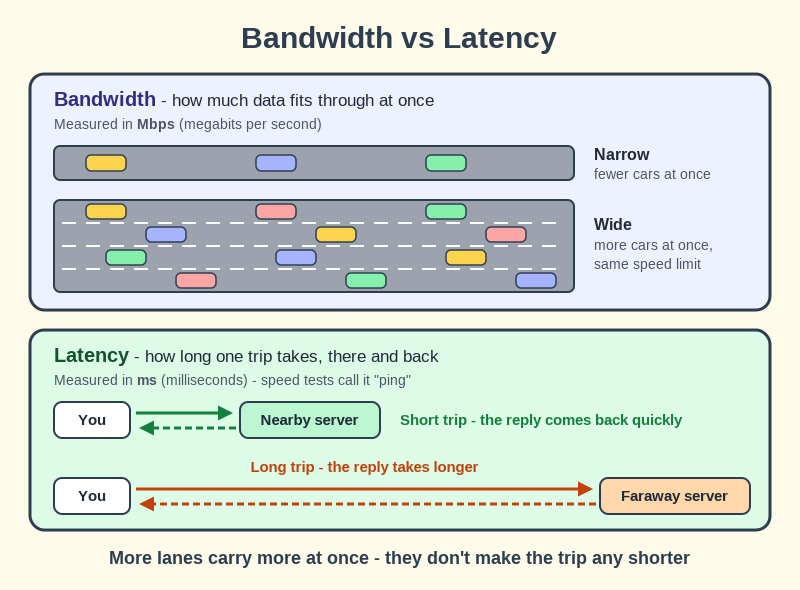
Picture your internet connection as a motorway. Bandwidth is the number of lanes: more lanes let more cars travel side by side, so a big delivery gets through sooner. Latency is how long one car takes to drive from one end to the other, which depends mostly on distance rather than on how many lanes there are. Adding lanes eases traffic jams, but it never brings the destination any closer.
What's happening
Summary
Bandwidth measures how much data a connection can move each second, latency measures the delay before each piece arrives, and the "speed" you notice depends on both, as well as on how many devices are sharing the connection.
A Closer Look
Bandwidth is measured in bits per second, usually megabits per second (Mbps) or, for very fast connections, gigabits per second (Gbps), where a gigabit is a thousand megabits. File sizes, on the other hand, are measured in bytes, and one byte is eight bits. That is why downloads never seem to reach your advertised number: a 100 Mbps connection moves at most about 12.5 megabytes per second, because you divide by eight. Look closely at the letters - a small b means bits and a capital B means bytes. In practice, downloads come in a little under even that figure, because some of the capacity carries the labels and checks that travel along with the data.
Latency is the delay before data arrives, measured in milliseconds (ms) - thousandths of a second. Speed tests usually show it as ping, the time a tiny message takes to reach a server and come back. Distance is the main cause: even through fibre-optic cables, signals need time to cross the world, and every router along the way adds a small pause. Reaching a server in your own country is noticeably quicker than reaching one on another continent, which is one reason big websites keep copies of their files close to their visitors. Wi-Fi adds a little delay too, and an overloaded connection adds a lot more, as data queues up waiting for its turn. When the delay keeps jumping up and down, that unevenness is called jitter.
Different activities lean on different things. Streaming a film needs steady bandwidth, but a little latency barely matters, because the app loads a few seconds ahead before playing. Online games send fairly small amounts of data but need it to arrive almost instantly, so low latency matters more than a huge connection. Video calls need both: steady bandwidth in each direction and low delay so the conversation flows naturally. Remember, too, that your bandwidth is shared: if one person is downloading a large game while another streams a film, everyone else gets what is left. Many home connections are also faster at downloading - bringing data to you - than at uploading - sending it out - which is why backing up photos can feel slower than viewing them.
Common Misconceptions
- A bigger broadband package doesn't automatically mean lower latency - extra bandwidth lets more data through at once, but it doesn't shorten the distance each piece has to travel.
- An advertised 50 Mbps doesn't mean 50 megabytes per second - speeds are quoted in megabits, so divide by eight to get just over 6 megabytes per second.
- Each device doesn't get its own full bandwidth - everything in your home shares the same connection, so one big download can slow down everyone else.
Frequently asked questions
How much bandwidth do I actually need?
It depends on how many people use the connection at once and what they are doing. Browsing, email and music need very little. Video streaming needs more, and sharper picture quality such as 4K needs much more than standard definition. Large game downloads and cloud backups gain the most from extra bandwidth. A household where several people stream and video call at the same time needs far more than one person checking email.
Why is my internet slower in the evening?
Evenings are when most people are home streaming, gaming and browsing, both in your house and across your neighbourhood. Parts of your provider's network are shared between many customers, and when they get busy each person's share shrinks, much like a road at rush hour. If your connection is regularly far slower at peak times than you were promised, run a few speed tests at different times and raise it with your provider.
Why does a video buffer when my speed test looks fine?
A speed test measures your connection to a nearby test server at one particular moment, but a video comes from the streaming service's own servers, which may be further away or busier. Weak Wi-Fi in the room where you watch, other devices downloading at the same time, or a brief dip in your connection can all interrupt the flow. Most video apps lower the picture quality automatically before they resort to pausing.
How it connects
Bandwidth and latency shape how every part of the internet feels:
Try it yourself
Search for internet speed test and run one, noting the download, upload and ping figures, then divide the download number by eight to see roughly how many megabytes per second you can really download. Next, start a video playing on another device and run the test again - you'll usually see the bandwidth being shared, and sometimes the ping creeping up too.