How Does Email Work?
Email sends written messages over the internet, passing them between mail servers until they land in the recipient's inbox.
Think of it like this
It works a lot like the post. You write a letter and hand it to your local sorting office, which reads the address and sends it on to the sorting office that serves the recipient's area. There it waits in a private PO box until the recipient comes to collect it. Your mail server plays the part of the sorting office, and your inbox is the PO box.
What's happening
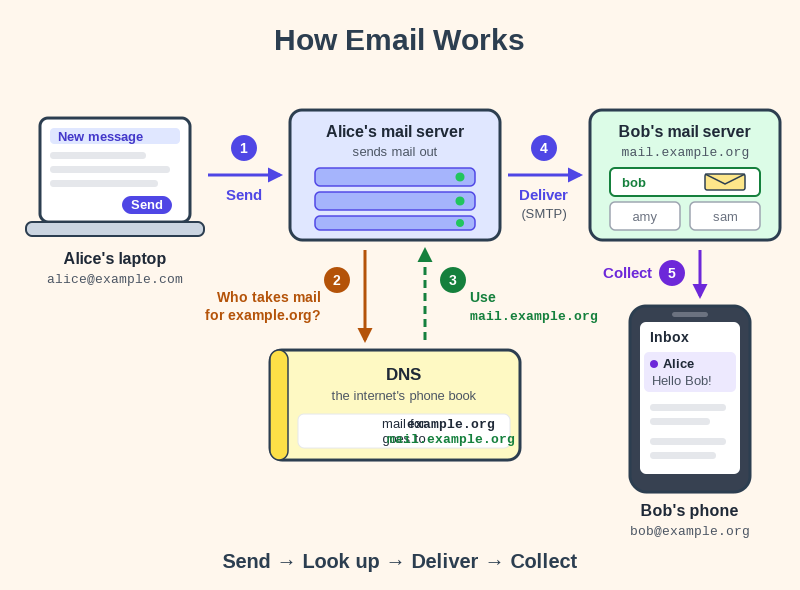
Summary
When you press Send, your email goes to your provider's mail server, which uses DNS to find the recipient's mail server and hands the message over. It waits there until the recipient's app collects it.
A Closer Look
Every email address has two halves joined by the @ sign: the part before it names the mailbox, and the part after it names the domain that looks after that mailbox. In [email protected], the message is for a mailbox called bob, held by whoever runs example.org. When you press Send, your email app hands the message to your provider's outgoing mail server. That server looks at the domain, asks DNS which server accepts mail for it, and passes the message across the internet using a shared set of rules called SMTP (Simple Mail Transfer Protocol). The receiving server checks that the mailbox exists, then files the message away.
The receiving server holds the message until the recipient's app comes to collect it. Most apps today use a method called IMAP, which leaves your mail stored on the server and keeps every device in step - read a message on your phone and it shows as read on your laptop too, and deleting it in one place deletes it everywhere. An older method, POP, downloads messages onto one device and usually removes them from the server. Webmail, where you read email in a browser tab, skips the app altogether: you are looking straight at your mailbox on the provider's servers. Underneath, every message travels as plain text. Pictures, formatting and attachments are converted into text-friendly code for the journey and rebuilt at the other end, which is one reason attachments come with size limits.
Email is older than the web. In 1971 an engineer called Ray Tomlinson sent the first email between two separate computers on ARPANET, the research network that grew into the internet, and chose the @ sign to separate a person's name from the name of their computer. The system was designed for a small community who trusted each other, so it had no built-in way to prove who a message was really from. That is why the sender shown on an email can be faked, and why scammers find email so useful. Modern mail servers add checks with names like SPF, DKIM and DMARC, which let a receiving server confirm that a message really came from the domain it claims, and spam filters weigh these up alongside the content before deciding what reaches your inbox.
Common Misconceptions
- Emails don't travel straight from your device to the recipient's - they pass through at least two mail servers on the way.
- Ordinary email isn't fully private - it's usually encrypted while travelling, but it's stored on the mail servers at each end in a form the provider can read, unless you use end-to-end encryption.
- Deleting an email from your Sent folder doesn't remove it from the recipient's inbox - their copy is completely separate from yours.
Frequently asked questions
Why do some emails end up in my spam folder?
Your provider's spam filter scores every incoming message using lots of clues: whether the sending server passed its identity checks, whether that sender has a history of sending junk, and whether the wording looks like typical spam or scams. Messages that score badly are moved aside. Filters sometimes get it wrong, so it's worth glancing at your spam folder now and then and marking genuine messages as 'not spam', which helps the filter learn.
Can I unsend an email?
Usually not, once it has truly gone. After a message reaches the recipient's mail server, it's out of your provider's hands. The 'undo send' button some services offer works by quietly waiting a few seconds before actually sending, giving you a short window to change your mind. Some workplace email systems can try to recall a message, but generally only between colleagues in the same organisation, and not once it has been read.
What does it mean when an email bounces?
A bounce is an automatic reply saying your message couldn't be delivered. The most common cause is a mistyped address, so the receiving server has no mailbox by that name. A bounce can also happen when the recipient's mailbox is full, the domain no longer exists, or the receiving server rejects the message as suspicious. The bounce message usually includes a short explanation of what went wrong, which is worth reading before trying again.
How it connects
Email relies on several other building blocks of the internet:
Try it yourself
Open any email you've received and look for an option such as Show original or View message source, often tucked inside a menu marked with three dots. Near the top you'll see lines beginning Received: - each one is a mail server that handled the message on its way to you, with the most recent listed first.