What is Phishing? How to Spot a Scam
Phishing is a scam where criminals pretend to be someone you trust - by email, text or phone - to trick you into handing over passwords, money or details.
Think of it like this
It's like someone turning up at your door in a convincing uniform with a clipboard, saying they're from the water company and need to come in urgently. The uniform and the urgency are the whole trick - they want you to act before you think to check. The safe response online is the same as at the door: don't take their word for it, and contact the company yourself using details you already know.
What's happening
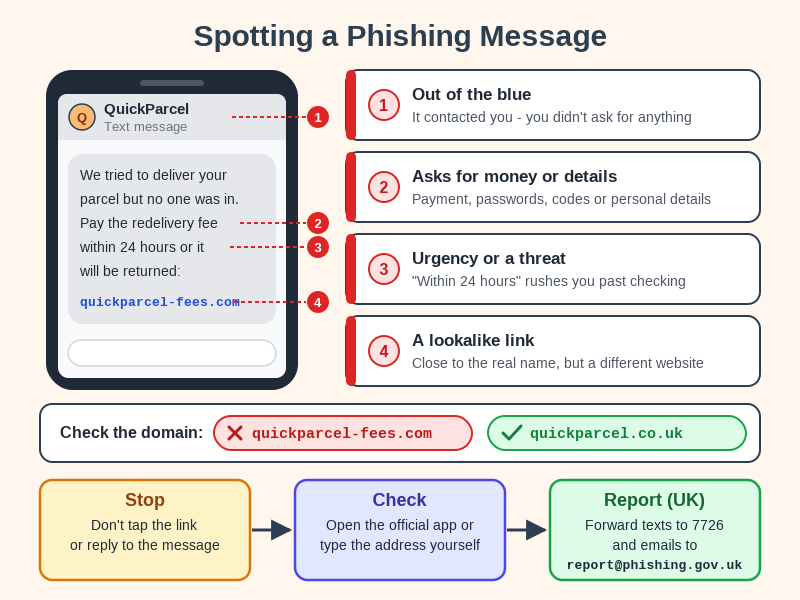
Summary
Phishing works by faking trust and creating urgency, so you act before you think. The best defence is a simple habit: never use the link or number in an unexpected message - check with the organisation directly, then report the scam.
A Closer Look
The name is a play on fishing: scammers cast bait out to huge numbers of people and wait to see who bites. The bait changes with the seasons - a parcel that needs a small fee before it can be redelivered, a tax refund, a problem with your bank account, a subscription that has failed to renew - but the recipe stays the same. The message borrows a name you trust, adds urgency or fear ("your account will be suspended today") or a tempting reward, and gives you an easy way to act right now: a link, a phone number or an attachment. Pressure is the key ingredient, because a rushed person skips the checks they would normally make without thinking.
Phishing by text message is often called smishing, and by phone call vishing (voice phishing). Scammers can spoof - fake - the name a text appears to come from or the number a call shows, so a scam text can even land in the same conversation as genuine messages from that company. Some scams are aimed at one person, using details gathered from social media or earlier data breaches, which makes them feel genuinely personal. Others pretend to be family: a message from an unknown number saying "Hi Mum, I've lost my phone, this is my new number" soon leads to an urgent request for money. However polished a message looks, its appearance proves nothing about who really sent it.
The single most effective habit is to check independently. If a message claims to be from your bank, a delivery company or a government department, don't use its link or phone number - open the official app, type the website address yourself, or ring the number on your card or a recent bill. Genuine organisations won't mind you doing this. In the UK, you can report suspicious emails by forwarding them to [email protected] and scam texts by forwarding them to 7726, which is free on most networks - these reports help get scam websites and numbers shut down. If you've already clicked a link or typed in details, don't feel embarrassed: change the affected password, and if bank details are involved, call your bank straight away.
Common Misconceptions
- Scams aren't always full of spelling mistakes and clumsy logos - many are polished copies of genuine messages, so a professional look proves nothing.
- It isn't only careless people who get caught - well-timed scams fool busy, tech-savvy people too, because they're designed to arrive when you're distracted or genuinely expecting a parcel.
- A message that knows your name, address or phone number isn't necessarily genuine - details like these are often taken from earlier data breaches and shared between criminals.
Frequently asked questions
Is it dangerous just to open a phishing email?
Usually not. Opening and reading an email is generally safe on an up-to-date device - the danger comes from what you do next: clicking a link, opening an attachment, replying, or calling a number in it. Some scam emails contain hidden images that tell the sender your address is active, which is one reason not to reply or click "unsubscribe" in an obvious scam. Report it, then delete it.
What should I do if a strange message seems to come from someone I know?
Their account may have been taken over, or someone may be pretending to be them from a new number. Don't reply to the message itself. Contact the person in a way you already trust, such as calling their usual number, and ask them directly. Be especially wary of any request for money, gift cards, or a code that has just been sent to your phone - a genuine friend won't mind you checking.
Why do I keep getting scam messages?
You don't need to have done anything wrong to receive them. Scammers send messages in enormous numbers, and phone numbers can simply be dialled or texted in sequence. Email addresses and phone numbers also leak in data breaches and are bought and sold between criminals. Reporting scams and blocking senders helps, and your email's spam filter learns from the messages you mark as junk.
How it connects
Phishing targets people rather than machines, so other defences help catch what slips through:
Try it yourself
If you're in the UK, save 7726 in your phone's contacts as "Report scam texts" and [email protected] as "Report scam emails", so reporting takes seconds when you need it. Then glance through your email's junk or spam folder - you'll probably find a phishing attempt or two. Without clicking anything, see how many warning signs you can spot before deleting them.