What are Passwords and Password Managers?
A password is a secret that proves an account is yours; a password manager is an app that creates and remembers a strong, different one for every account.
Think of it like this
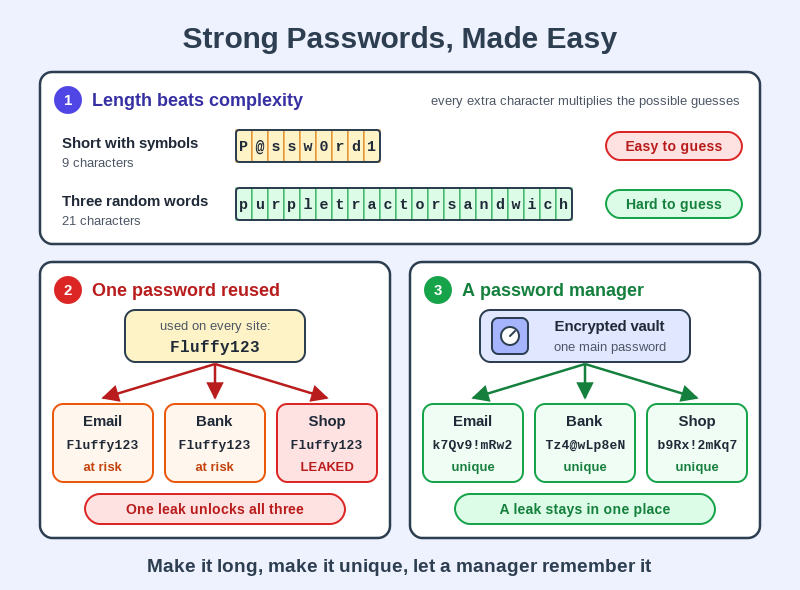
Think of your accounts as doors and your passwords as keys. Using one password everywhere is like having a single key that opens your house, your car and your office - lose it once and a thief can walk into all three. A password manager is like a locked key safe: it holds a different key for every door, and you only need to remember the code to the safe.
What's happening
Summary
Strong passwords are long, hard to guess and never reused. A password manager makes that practical by creating and remembering a unique password for every account, so you only have to remember one.
A Closer Look
Criminals rarely guess passwords by hand. They use software that tries enormous numbers of possibilities, starting with the most likely ones: lists of common passwords, dictionary words, names, dates and the predictable tweaks people make, such as swapping a for @ or adding 1! to the end. That's why P@ssw0rd1 looks complicated but falls quickly. What really slows guessing down is length, because every extra character multiplies the number of possible combinations. The UK's National Cyber Security Centre suggests joining three random words, such as purpletractorsandwich - long enough to resist guessing, yet far easier to remember than a jumble of symbols. The words need to be genuinely random, not a famous phrase, a song lyric or anything about you that could be found online.
A password manager keeps your passwords in an encrypted vault - a scrambled file that only becomes readable once you unlock it with your one main password, or your fingerprint or face on a phone. When you create a new account, it can generate a long random password and save it for you. When you come back, it fills it in automatically, and most can sync between your phone and computer. There's a hidden bonus too: each saved password is linked to the exact website it belongs to, so the manager won't offer your bank password on a convincing fake copy of your bank's site. If it unexpectedly stays quiet on a login page, that's a good reason to stop and check the address.
A well-run website never stores your actual password. Instead it stores a hash - the result of putting your password through a one-way mathematical scramble that can't simply be reversed. When you log in, the site scrambles whatever you type in the same way and checks whether the two results match. This is why a company can reset your password but should never be able to tell you what it was. It also explains why strong passwords still matter when a site is breached: attackers who steal a list of hashes have to keep guessing, scrambling candidate passwords until one matches. Short and common passwords are uncovered quickly, while long, random ones usually stay hidden. A site that emails you your existing password is a warning sign that it isn't storing it safely.
Common Misconceptions
- Adding a capital letter, a number and a symbol doesn't automatically make a password strong - predictable patterns like
Summer123!are among the first things guessing software tries. - You don't need to change your passwords on a fixed schedule - mainstream advice is to change one when there's reason to think it has been exposed, and otherwise to focus on making each one long and unique.
- Writing passwords down isn't automatically a bad idea - a notebook kept safely at home is out of reach of online criminals, though a password manager is more convenient and goes with you.
Frequently asked questions
What is a passkey, and will it replace passwords?
A passkey is a newer way to sign in without typing a password at all. Your device creates a matching pair of digital keys: one stays with you, on your device or in your password manager, and the other is stored by the website. To sign in, you just unlock your device with your fingerprint, face or PIN. Passkeys can't be guessed, reused or typed into a fake site, and many major services now offer them alongside passwords.
What happens if I forget my password manager's main password?
With many password managers, nobody - not even the company - can open your vault without it, because it's the key that unscrambles your data. That's a deliberate security feature, but it means forgetting it can lock you out for good. Choose a main password you'll remember, such as three random words, set up any recovery options the manager offers, and consider writing it down and keeping it somewhere safe at home.
How do I start using a password manager without changing everything at once?
There's no need to do it all in one sitting. Start by letting the manager save passwords as you naturally log in to things, and let it create a new one whenever you sign up for something. Then change the passwords on your most important accounts first: email, banking, and any shopping sites that store your card details. The rest will follow over the coming weeks as you use them.
How it connects
Passwords are the first lock on almost everything you do online:
Try it yourself
Open the password manager built into your phone or browser (search your settings for "passwords") and look for a security check or recommendations section. It lists passwords you've reused or that have appeared in known data breaches. Start by changing the password for your email account, since it can be used to reset all the others.