What is a QR Code?
A QR code is a square pattern of black and white blocks that stores a short piece of information, usually a web address, for a phone camera to read.
Think of it like this
It's like a note written in a secret shorthand that only a phone can read. You can't make sense of the pattern by looking at it, but the camera translates it in an instant into a web address, a phone number or a Wi-Fi password. Like any note from a stranger, though, what matters is what it actually says - and the shorthand hides that until it's decoded.
What's happening
Summary
A QR code is a quick way to pass information, usually a link, from a printed square to your phone. The camera decodes it instantly, but it's still up to you to check where it leads before you tap.
A Closer Look
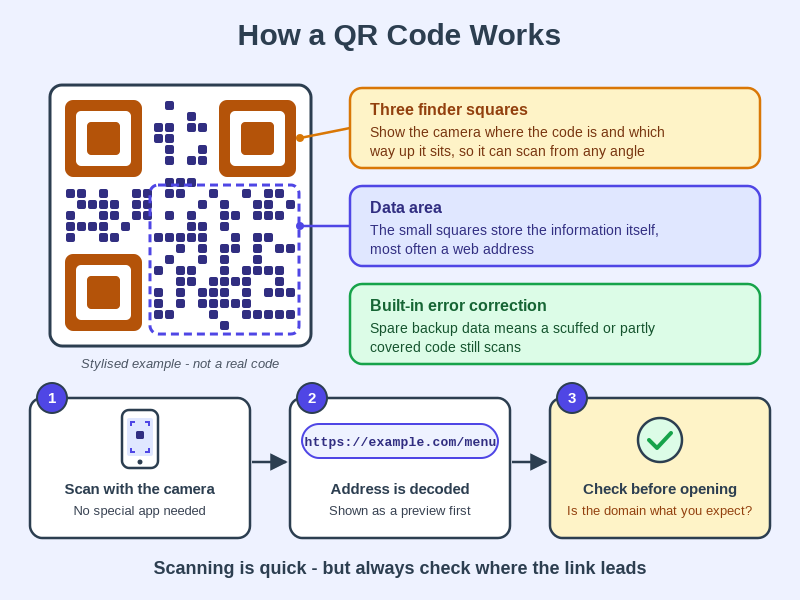
QR stands for Quick Response. The codes were invented in 1994 at Denso Wave, a Japanese company, to track car parts as they moved through factories, because ordinary barcodes couldn't hold enough information. A traditional barcode stores data in a single row of lines, read from side to side. A QR code uses both directions of a square grid, so it can hold far more - a full web address or a short paragraph of text. The three large squares in the corners are finder patterns: they show the camera where the code is and which way up it sits, which is why you can scan one at an angle or even upside down. The small squares filling the rest carry the data itself.
QR codes also carry extra backup information alongside the data, a feature called error correction. If part of a code is scratched, smudged or covered, the phone can rebuild the missing pieces from what remains, which is why some codes still scan with a logo printed in the middle. Most codes hold a web address, but they can also contain plain text, a phone number, contact details, or the name and password of a Wi-Fi network so guests can join without typing. Denso Wave chose not to enforce its patent, so anyone can create and print QR codes for free. The code itself is only stored text and can't run anything; what counts is what your phone does with that text next.
Because nobody can read a QR code by eye, scammers use them to hide dodgy links, a trick nicknamed quishing (QR code phishing). A well-known example is a fake sticker placed over the genuine code on a parking meter or car park sign, leading to a convincing payment page that collects card details. Others turn up in emails or letters claiming a parcel is waiting or an account needs checking, partly because a code can slip past email filters more easily than a normal link. The defence is the same habit as with any link: when your phone shows the decoded address, read the domain before tapping it. Check that printed codes haven't been covered with a sticker, and pay through the official app or a website you type in yourself.
Common Misconceptions
- QR codes aren't a recent invention - they date back to 1994, long before restaurant menus and parking meters made them familiar to most people.
- Scanning a QR code on its own is very unlikely to harm your phone - the danger comes from the website or download it leads to, and what you type in there.
- You usually don't need a special app to scan QR codes - the built-in camera app on most modern phones reads them automatically.
Frequently asked questions
Is it safe to scan a QR code?
Scanning on its own is very unlikely to harm your phone, because the camera simply reads the text stored inside. The risk comes from where that text leads, such as a fake login or payment page, or a prompt to download an app. Use your phone's built-in camera, which shows a preview of the address before opening it, and be especially cautious with codes on stickers, in unexpected emails, or that lead to pages asking for passwords or card details.
Do QR codes expire?
A standard QR code never expires, because the information is printed right into the pattern. However, many codes made with online generators are dynamic: they actually contain a short link to the generator's own service, which then forwards you to the real address. That lets the owner change the destination later, but if the service closes or a subscription lapses, the code can stop working or lead somewhere unexpected.
How can I make my own QR code?
Many browsers can create one for the page you're viewing, usually from the share menu, and plenty of free online generators exist. For anything you'll print, choose an option that makes a standard (static) code containing your actual address, so it keeps working with no account needed. Keep strong contrast between the dark and light squares, leave a plain margin around the edge, and test it with a couple of different phones before printing lots of copies.
How it connects
Most QR codes are simply a shortcut to a web address, so these pages help you judge where one leads:
Try it yourself
Point your phone's camera at a QR code nearby - on a product box, a poster or a letter - but don't tap the link that appears. Just read the address in the preview and work out which domain it would take you to.